On Track · 2025
Case Study

On Track

Shanghai Metro Verification App

Not a navigation app — a boarding verification app. On Track helps passengers confirm they're on the right train before it's too late, solving the last-mile uncertainty moment on Shanghai's sprawling metro network.

Type
Academic Project
Platform
Mobile Web (React)
Network
Shanghai Metro Line 2
Stack
Vite · React · TypeScript
Try Live Demo
My Role

Project Snapshot

Role
UX/UI Designer Interaction Designer
Timeline
2025 Academic Project
Methods
Problem framing User flow mapping Wireframing & prototyping Usability-oriented iteration
Deliverables
Mobile web prototype Verification flow UI system Recovery states
Tools
Figma React · TypeScript Vite · Vercel
01

Problem & Research

Route Known, Boarding Still Uncertain

Shanghai Metro Line 2 runs east-west across the city — two directions, identical platforms, easy to board the wrong train. The real problem isn't not knowing the route. It's the uncertainty that happens after the route is already known.

The Problem

Metro apps tell you where to go — but not whether the train arriving right now is actually going the right direction. On a busy platform, this ambiguity causes missed trains, wrong boardings, and unnecessary anxiety — especially under time pressure.

Target User & Context
Who

International visitors or new riders using Shanghai Metro under time pressure. They may know the route but can't quickly interpret Chinese station signs, train terminal displays, or platform direction cues.

Core Pain Point

The riskiest moment is not route planning — it's real-time confirmation before and after boarding. Station signs, terminal directions, train displays, and language barriers must all be interpreted quickly.

Primary User Persona
Sarah M.
27 · International Visitor
First visit to ShanghaiNo Chinese literacyTime-pressured
Situation
Arriving at Hongqiao Railway Station, needs to reach Pudong. Has 25 minutes before a meeting.
Frustration
Google Maps shows the route but stops at the platform. Can't read Chinese signs to confirm direction.
Goal
Board the correct train on the first attempt. No missed connections.
Research Methods
3
User types simulated
4
Research methods
5
Friction points
Desk research on Shanghai Metro signage systems
Experience mapping across 6 uncertainty nodes
Persona-based cognitive walkthrough (3 user types)
Live demo observation on actual app flow
Journey Uncertainty Map
EXISTING APPS HANDLEON TRACK COVERS THIS ZONE01Route PlanningKnow where to go02Station EntryReach the platform03GAP BEGINSPlatform DirectionWhich way is my train?04Train ArrivesShould I board this?05OnboardAm I still going right?06Get-off TimingWhen do I exit?LOW UNCERTAINTYHIGH UNCERTAINTY — EXISTING TOOLS FAIL HEREJourney Uncertainty Map · On Track · Shanghai Metro Line 2

Nodes 01–02 are where existing navigation apps excel. Nodes 03–06 mark the verification gap — the moments no existing tool addresses clearly. On Track is built entirely for this zone.

Research & Journey Insights
01
Desk Research
Reviewed Shanghai Metro signage systems, route behavior patterns, and common direction-confirmation moments on bi-directional lines.
02
Experience Mapping
Broke the journey into uncertainty nodes: station entry → platform choice → train arrival → onboard confirmation → get-off timing. Each node carries different anxiety levels.
03
Persona-Based Cognitive Walkthrough
Simulated three international user types — a first-time tourist with no Chinese literacy, an experienced transit user prone to skipping confirmation steps, and a partial-language user. Three recurring friction points were identified across the verification flow.
04
Pain Point Synthesis
The highest-anxiety decision points cluster around the platform and boarding moment — not route selection. Existing apps stop helping exactly where users need help most.
Walkthrough Findings
F01
Direction labels need terminal anchoring
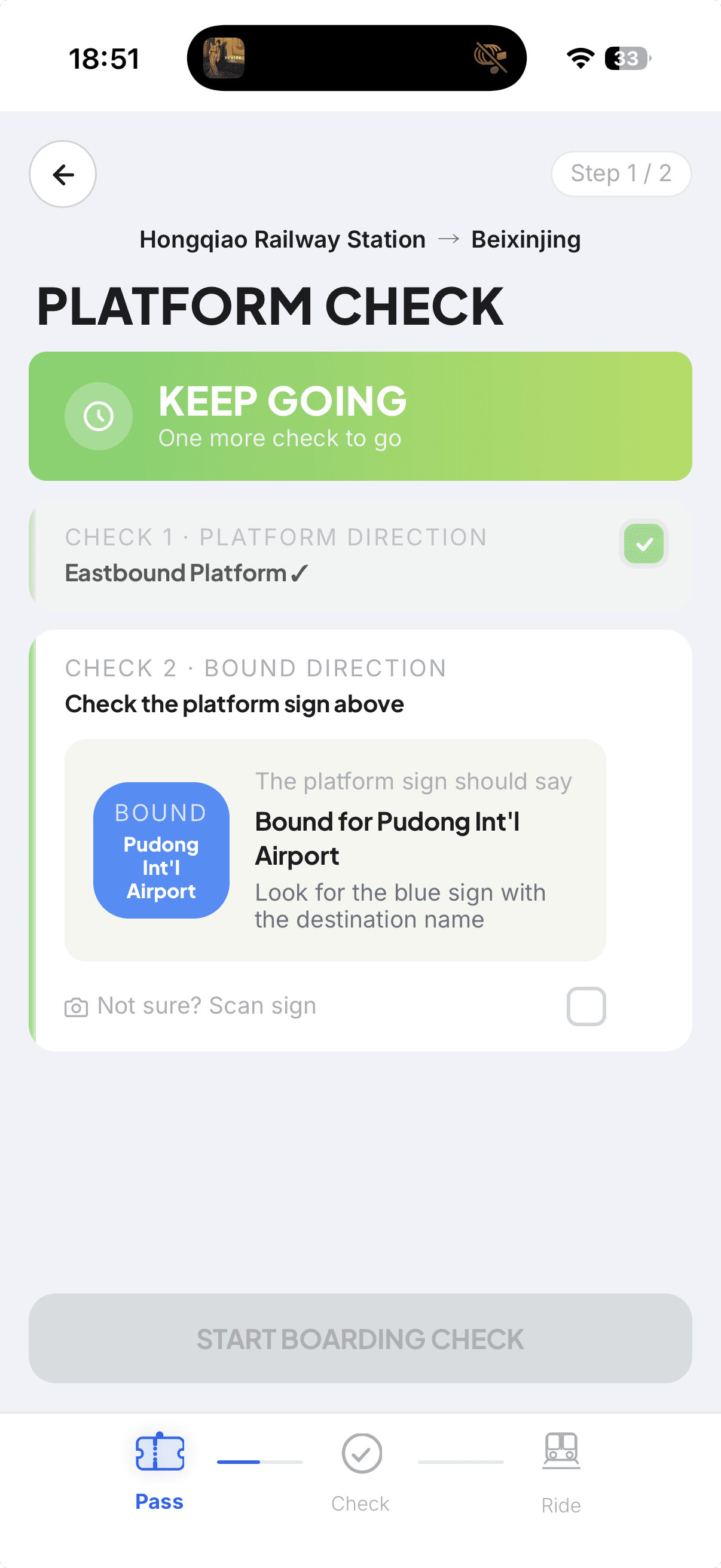
"EASTBOUND" as a primary label caused disorientation in first-time users unfamiliar with Shanghai's geography. The terminal station name ("Towards Pudong Int'l Airport") functioned as the actual wayfinding cue — validating the Scan Sign feature as a critical fallback for users who cannot match Chinese platform signs to app prompts.
F02
Confident users skip sequential confirmation
Users with prior transit experience showed a pattern of scanning rather than reading — treating Boarding Check as a formality. The sequential dependency between CHECK 1 and CHECK 2 was not intuitively communicated, pointing to a need for clearer progressive disclosure.
F03
Error trigger visibility is lowest at highest-stakes moment
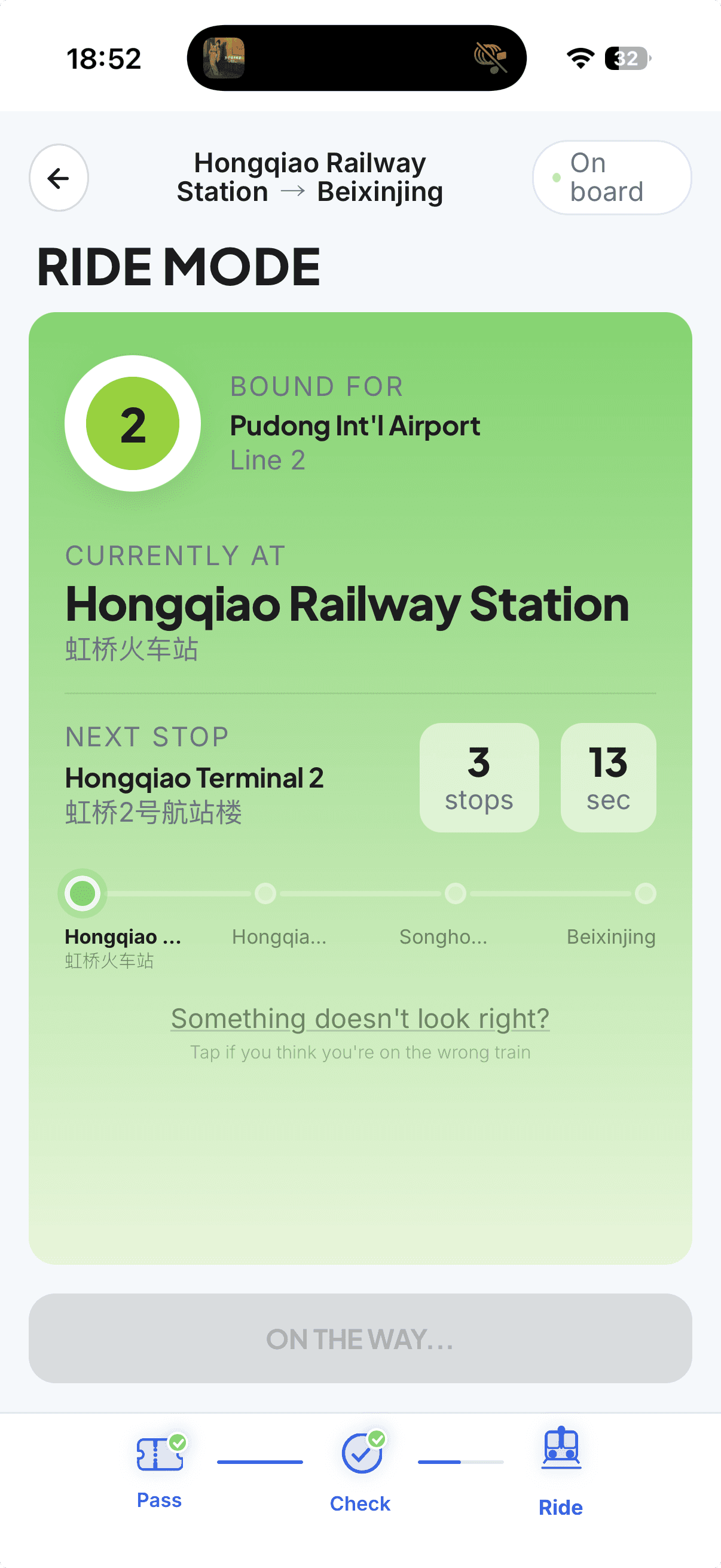
"Something doesn't look right?" in Ride Mode registered as low-priority text across all three personas. Under time pressure, this interaction — the only mechanism for catching a wrong boarding — carries the least visual weight of any actionable element in the flow.
Insights → Design Decisions
What We Observed
Design Response
1

"EASTBOUND" without terminal context caused disorientation — first-time users don't know which way is east.

Terminal station name added as primary wayfinding cue. "Not sure? Scan sign" added as a language-barrier fallback.

2

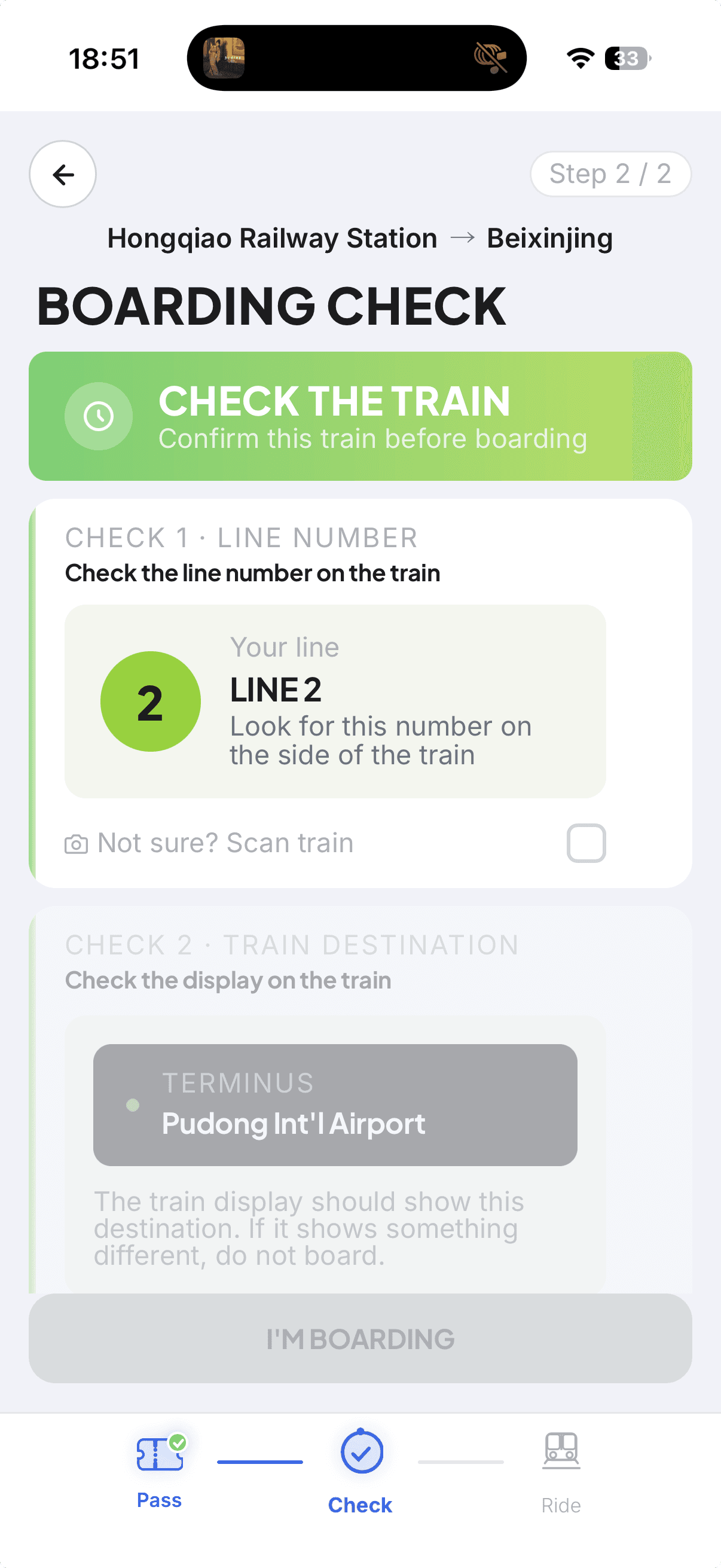
Experienced transit users tend to scan rather than read — skipping CHECK 2 before CHECK 1 was confirmed.

Sequential lock: boarding destination only unlocks after line number is confirmed. Order enforces attention.

3

"Something doesn't look right?" had the lowest visual weight in the flow but sits at the highest-consequence moment.

Large status labels dominate each screen — status is readable before layout is parsed. Error trigger given subtitle for discoverability.

4

Chinese station names on real train displays are unreadable for most international users.

All station names shown bilingually (English + Chinese) in Ride Mode — users can match what they see on the train.

5

Route planning anxiety is already resolved before users arrive at the platform.

Route planning removed entirely. On Track starts at the platform — narrowing scope sharpened every screen's purpose.

Design Opportunity

Instead of replacing navigation apps, On Track focuses on the last-mile verification moment: "Am I on the correct platform?" "Should I board this train?" "Am I still going the right way?" — three questions no existing app answers clearly.

Sketches & Wireframes
Problem FramingCognitive WalkthroughJourney MappingPain Point SynthesisWireframing
02

User Flow & Decision Logic

Verification, Not Navigation

The flow is not a linear checklist — each step answers a specific user question with a binary outcome. The key design decision was separating static environment verification (Platform Check) from dynamic train verification (Boarding Check), because they require different information and carry different anxiety.

Decision Logic Per Step
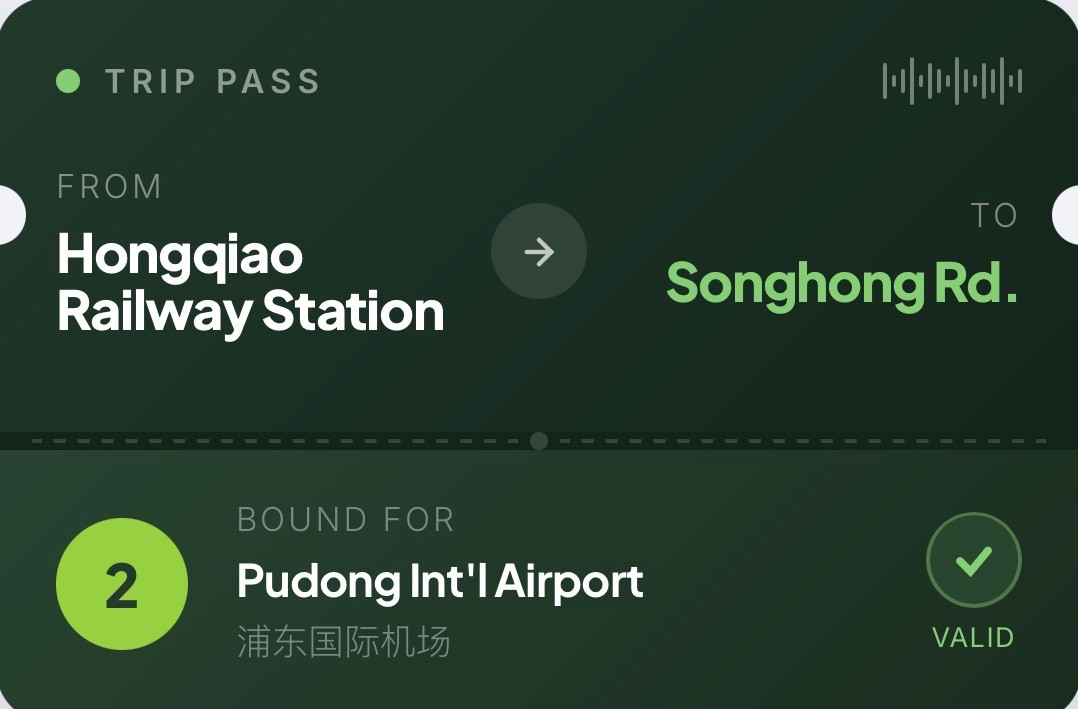
Trip Pass
What am I trying to verify?
Creates the expected line, bound, and destination — the persistent source of truth throughout the flow.
Platform Check
Am I on the correct platform?
Verifies static environment cues: station name, line number, direction. If mismatch → Hold and recheck.
Boarding Check
Should I board this train?
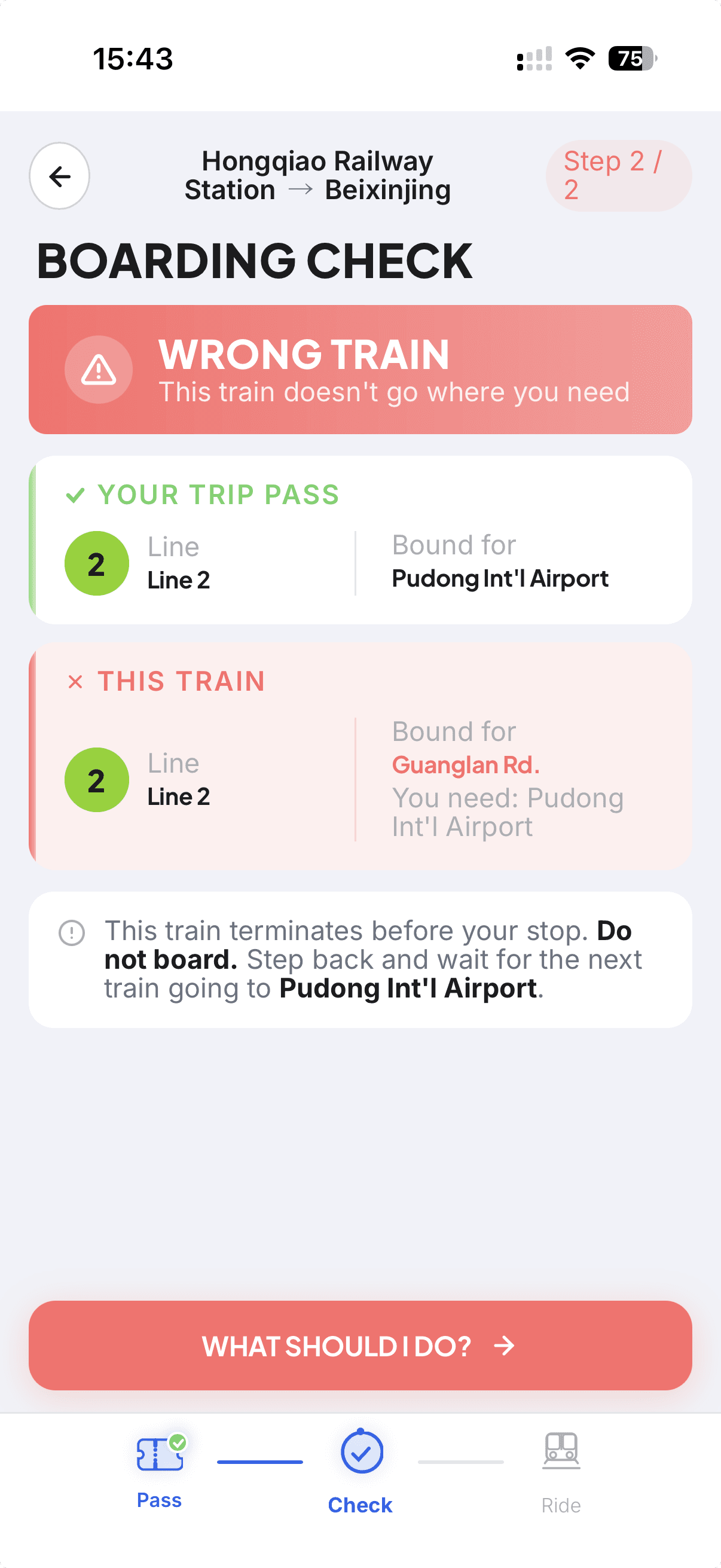
Verifies dynamic train display: terminal, direction, line. If mismatch before boarding → Do Not Board.
Ride Mode
Am I still on the right train?
Ongoing confirmation during the ride. If mismatch detected after boarding → exit at next stop.
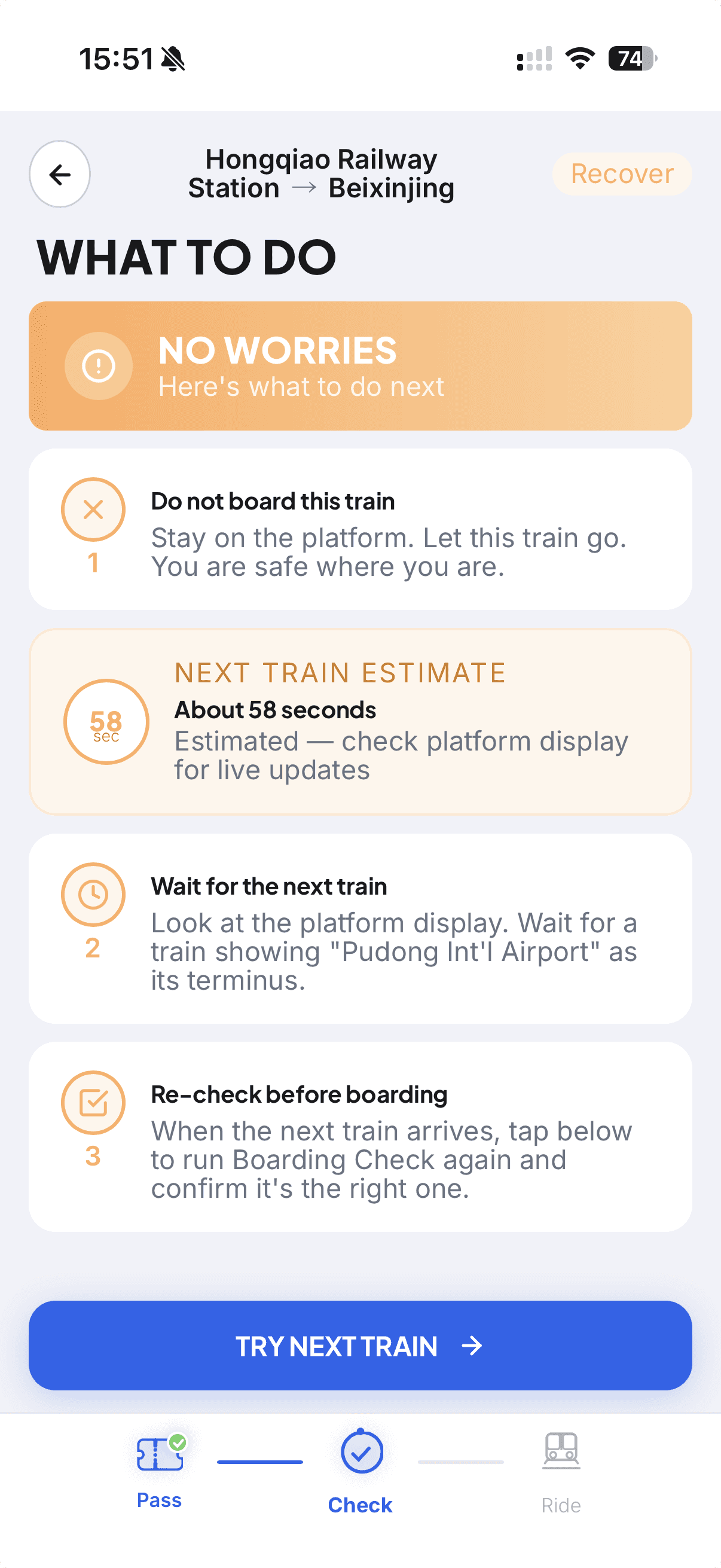
Recovery
What do I do now?
Contextual recovery: Wrong Platform → stay, recheck. Wrong Train (onboard) → get off next stop, reroute.
Key Screens
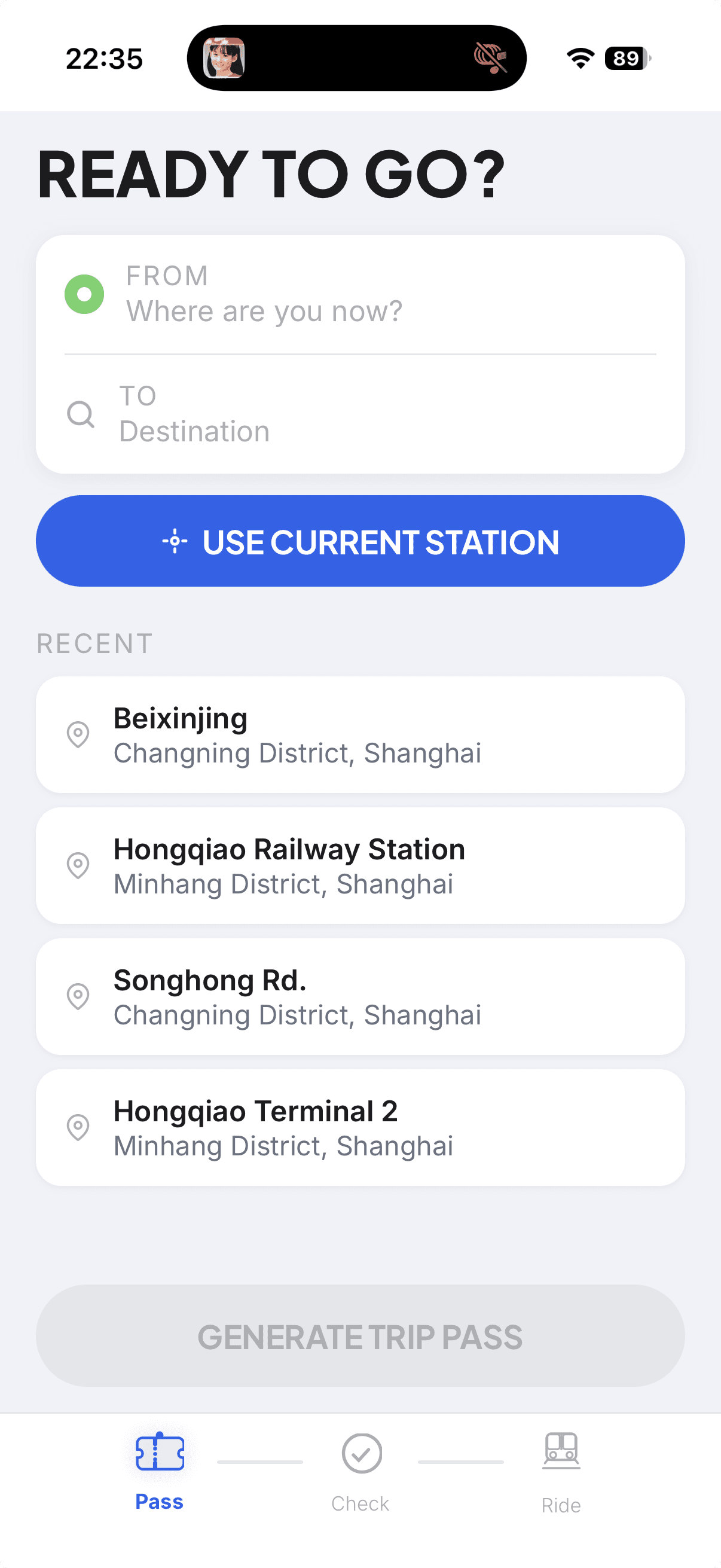
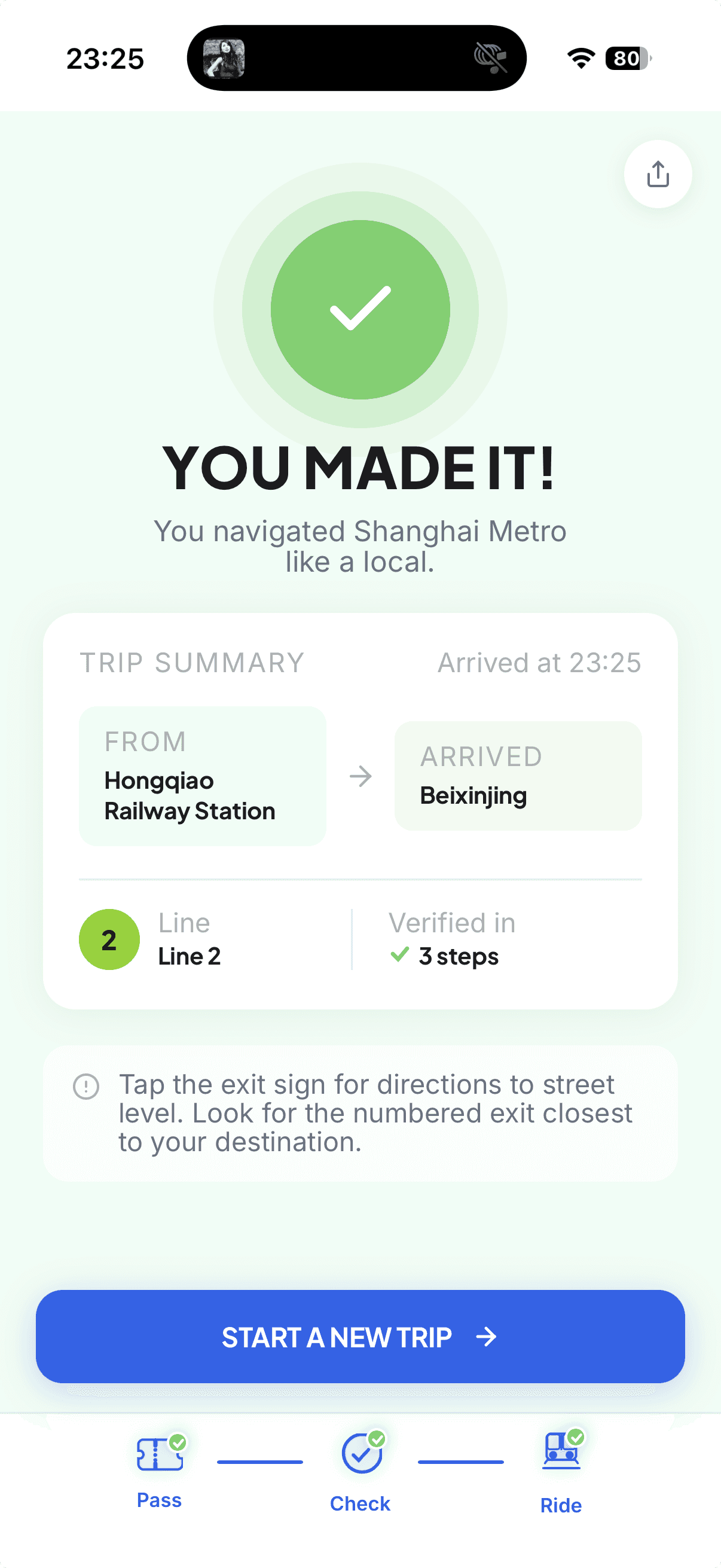
HomeSelect origin & destination
PlatformConfirm direction & station
BoardingVerify Line 2 + terminal
Ride ModeAuto-advance after 5s
ArrivedTrip complete
Decision FlowBinary VerificationState LogicAuto-AdvanceRecovery Branch
03

Design System

Designed for Confidence

Every system decision was evaluated against one question: does this reduce user anxiety or increase it? The goal was a UI that delivers instant, unambiguous status — not a visual showcase.

Why These Components
Trip Pass
Persistent source of truth. Stays accessible throughout the flow so users can always re-verify what they're trying to confirm.
Progress Bar
Reduces uncertainty by showing verification stage. Users know where they are and what comes next — critical under time pressure.
Color Semantics
Prevents false confidence. Green only appears in verified states, coral only in error states. No green CTAs — color is reserved for meaning.
Large State Labels
Fast judgment at a glance. When a train is arriving and you have 10 seconds, you need to read status instantly without parsing layout.
Recovery Cards
Turn errors into next actions. Wrong train is not a dead end — the recovery state gives a clear, immediate path forward.
Auto-Advance (5s)
Reduces manual friction. After boarding confirmation, Ride Mode activates automatically — one less tap when hands are full.
TripPassCard

Dark green ticket stub (#1A3A2A) with barcode, tear-line, notch cutouts, and Valid badge — a physical transit metaphor that gives users instant orientation.

TabBar Progress

Pass → Check → Ride with animated connector lines, driven by useLocation() per route. Gives users a continuous sense of progress without extra cognitive load.

Color Tokens
Primary
#2563EB
Verified
#6AD168
Error
#FF6B6B
Amber
#FFAB5E
BG
#F2F2F7
Text
#1C1C1E
Typography
Status NamePlus Jakarta Sans 800 · Uppercase
Section HeadPlus Jakarta Sans 700 15px · Uppercase
Body / CaptionInter 400 · 15px
Design TokensComponent SystemTripPassCardProgress IndicatorColor Semantics
04

Iterations

What Changed & Why

The final design is not the first design. Three key shifts shaped the difference between a UI demo and a UX tool.

01Scope Narrowed
Before

Earlier version tried to behave like a navigation app — it offered routing, station search, and line maps.

After

Final version narrowed to verification only. By removing route planning entirely, every screen could focus on the one moment that mattered: "Am I in the right place right now?"

02Checks Separated
Before

Earlier platform check mixed static signs and dynamic train display into a single confirmation step.

After

Final version separated Platform Check (static, environment) from Boarding Check (dynamic, train). These are different anxiety points requiring different information — combining them created confusion.

03Color Reserved
Before

Earlier success states overused green CTAs throughout the interface — buttons, labels, and confirmations all appeared in green.

After

Final version reserved green exclusively for verified status and coral for error states. No green buttons — active actions are blue. Color became a signal, not decoration.

Scope ReductionIterative DesignDesign DecisionsBefore / After
05

Failure States & Recovery

Designing for Misverification

Designing for failure states is as important as the happy path. On Track handles four distinct misverification scenarios, each with a clear exit path — because the cost of a wrong boarding is real time lost.

Wrong Platform
When
Detected at station entry
Recovery
Stay. Re-read signs. Recheck direction before moving.
Do Not Board
When
Train arrived at platform does not match expected terminal
Recovery
Do not enter. Wait for the correct train. Boarding check stays open.
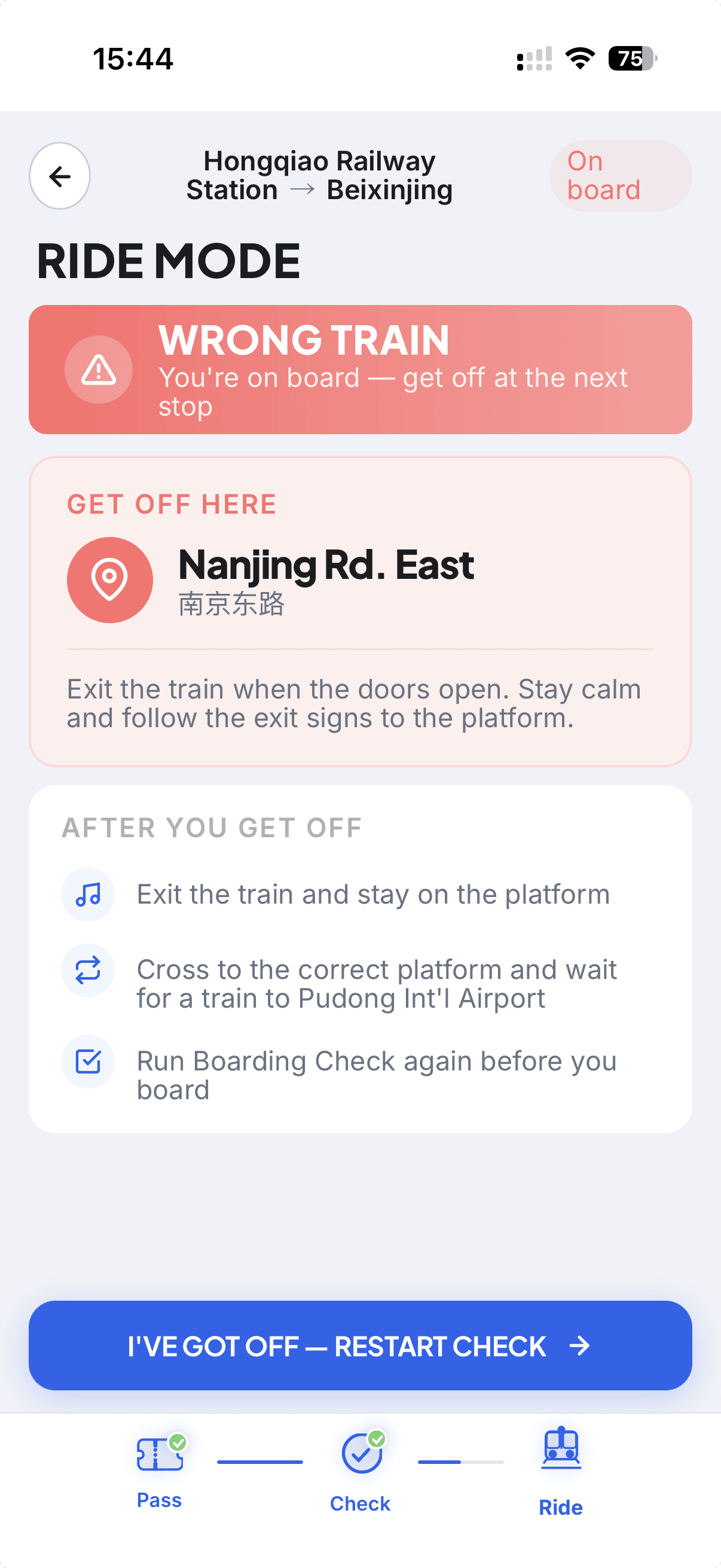
Wrong Train (On Board)
When
Mismatch detected after boarding
Recovery
Remain calm. Get off at the next stop. Recovery screen activates with reroute options.
Missed Get-off
When
Ride Mode auto-advances past destination
Recovery
Next-stop recovery: app detects overrun and surfaces nearest transfer or exit.
Wrong Train
Detected at platform — exit before boarding
Wrong — On Board
Detected after boarding — get off next stop
Recover
60s countdown timer — reroute or wait
Design Decision

No green CTAs — color is reserved for status meaning. Active buttons are blue (primary action) or gray (inactive). Green only appears in the verified state, coral only in error states, making status instantly readable under time pressure.

Error StatesRecovery Flow60s TimerColor SemanticsFailure Design
Reflection

Outcome & Takeaway

Final Outcome

A mobile web prototype that reframes metro assistance from route planning to moment-by-moment verification — a tool built around the highest-anxiety decision points in a transit journey, not the easiest ones to design for.

What I Learned

Good UX is sometimes about reducing scope. By deciding not to become another navigation app, On Track could focus entirely on the one moment no existing tool handles well. Narrowing the problem made the design better.

On Track · Shanghai Metro Verification App